Showing posts with label Textures. Show all posts

Thursday, September 27, 2012

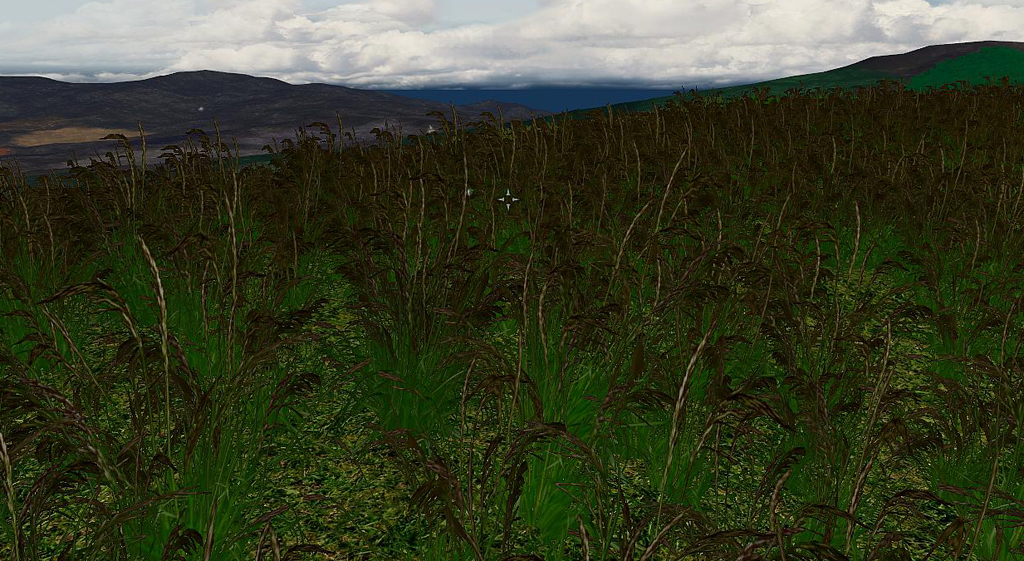
Hoddminir Grasses


I'm finished with all the grasses I had planed to do, for now at least. You can find them on Nexus here:

There is 37 different grasses, some with yellow variants. I got permission from the creator of Lush Grasses mod to use his models to have a more lush variant model as well. Thanks SparrowPrince :)

There is grasses with just blades or blades and plumes, and there is small and big grasses.  I'm pleased with the details in some of them. Hopefully this will give all that variation that I have been hoping for. I really look forward to mixing some of these together with the summer flowers I will do next. There is potential to create some beautiful meadows, or vast grassy plains :)

Until I can let you all play with this, here are some pictures on some of the different species.


/E

Monday, August 27, 2012

The many projects

I have been sick for the last two months, nothing too serious, but it has left me tired and lacking energy. As a result I have not been so active with the modding as I would have liked. But whenever I found some extra energy I've taken new photos of all the nice summer plants and flowers I could find :)
Now I have more then enough texturing work to last me through the autumn and winter...
I thought that I would share what's in the pipeline. But don't hold your breath, it will take some time to finish all of this :)

Projects

Climbing plants

The idea is to make more climbing plants to have something else than ivy climbing up houses and walls. So far I have made some variants of Morning Glory, but I'm planing on doing Clematis and Honeysuckle as well.


Spring plants II

I have some additional spring flowers I would like to have, some are present in the first release, but most are new. For example I will be making new bluebells and at least four new variants of Lily of the valley. There will be around ten new flowers including Forget me not, Hellebores, Violets and Fritillary.

Summer plants

This is by far the largest project right now. I have calculated that I have photos of 64 different species of summer flowers, and for many of them I have several different photos (with some color variants) to add some variation to the world. As of right now there are 170 textures I will have to clean up, and the summer is not over yet :)
I have only started to work on this, and I'm done with 3, a large Bellflower, Lady's bedstraw and one Heather.

Grass

I have talked about this earlier, that I'm making more grasses for the game. Now I think I have all the textures I need, about 50 different ones. I had no idea there where so many different species of grass growing around here. The idea is to have both different blades and grass "flowers", short and tall grass, as well as green and yellow variants. I will also include oat, wheat and barley among the grasses.

Water plants

When I first had a look at the different plants in Skyrim I was struck by the lack of water plants. It really makes the water feel like a wasteland. So far I have photos of 15 different seaweeds/kelp, 3 fresh water plants. I will also be making some above water plants like water lilies, bulrush and reed.


Walls and houses

I have already shown some of the re-texturings of houses I have made. So far I have re-textured Whiterun town and farm houses. I'll also look at Solitude and Riften houses and see if my new textures will look good on them.

And the more I build the more things gets a new texture variant :) Like stone walls and wooden fences.


Update 2012-09-05

Rocks and Cliffs

When I build with rocks and cliffs they are only one color available and it looks rather odd togetter with my rock ground textures. I applied the same texture to the a rock and around 20 of the ground textures looks good. I'll also have to match up the grass/dirt part of cliffs and banks to my ground textures. 

And then there are some projects I haven't really started yet, like new cobblestone ground textures and new bushes and trees. I have a feeling there will not be many things with the original textures when I'm done...
I'll keep you all posted on the development of these projects and more :)
/E

Monday, June 18, 2012

New ground textures of rock and other

I'm now done with the rock ground textures, in total there are 40, each with two color variants.

I also made some more Bark, Dirt, and Grasses.


I think that is all I will do for now. It's time for me to release these, just have to go through them again to check that they work, and look OK. At the moment I have made 165 new textures, each in 2 different color variants, that is a total of 330 new ground textures to play with :)

I'm sure that I will find more possible textures later on, but they will have to be released as a separate resource pack.

/E

Sunday, June 10, 2012

New green grasses

Today I when for a walk and took photos of grasses. The idea is to re-texture the Skyrim grass with some new variants. I'm going do some different color variants of each type.
The first one is done and there is more to come :)

/E

Monday, June 4, 2012

New groun textures of Moss

So far I made 19 moss and lichen textures, with some different colors. Two of the textures even has lingon berry bushes in them :)

/E

Sunday, June 3, 2012

New ground textures with grass

Grasses are coming along nicely. There is 18 different ones so far, both green and brown. There will possible be some more with other plants as well, we'll see what more I can find to photograph that would look good.


/E

Saturday, June 2, 2012

New ground textures with Leaves

I now feel more or less done with ground textures with leaves and there is 20 different variations. All photos are taken during spring, so no autumn colored leaves jet, that will have to wait until autumn is here. There are textures with leaves of oak, willow, aspen, maple, beech and birch.


I thought that I would have been done by now with this texture package, but I have to many projects running at the same time. I realize now that this texture pack will be huge, and will take some more time to finish. Still to do is grass, dirt, stone, moss and gravel. Next I'll work on ground textures with grass and other plants.


Just a sneak preview of a green and nice grass :)
/E

Sunday, May 20, 2012

Undergrowth

I have been working with Ztree to make new undergrowth plants (there is a thread on the Bethesda forum). Ztree has made some really nice new models :)
My favorites so fare is the fern and crane models, I can see that they could be very useful.
So far I have only made high resolution textures of woodland cranes and anemones, but I will keep working.

Update:
I made a braken fern texture on two different models, an unknown plant on a fern model, Meadow sweet (without flowers) and Lady's Mantel.


Update: 2012-09-11
ZTree just released his trees and with them among other things the undergrowth plants.
I have made some more textures (the pictures above) that you can download from here:
1k resolution and 2k resolution.

I really recommend this resource, there are some nice trees, rocks and plants. I'll be using them a lot :)

/E

Sunday, May 13, 2012

New Sand ground textures

I'm slowly working through all my pictures from Ireland. I'm more or less done with the sand textures. Some of them are still a bit repetitive and will need some more work, especially those with stones. In total there is 28 different textures so far, with a light and a dark version.

Here are some pictures of how they look in game.

Dry sand

Wet sand

Sand with seashells

Sand with stones

Next I will work on more ground textures with leaf covers, some dirt, mountain rock, and lots of grasses/plants.
/E

Saturday, April 21, 2012

New ground textures


I have been home all week with a nasty cold, but I tried to do something fun when I had the energy. The has resulted in 16 new 2048 resolution ground textures of leaves, needles, grass and some gravel. They all have a light and a dark variant, I can't decide which I like best so I'll probably keep both. I have lots of photos of moss and stones that I will keep working on.

Everything was working great, they were seamless and look really nice in the game. Then something happened when I saved new ones as dds, and now things are not so nice anymore...

So, when I save as dds (without alpha) as DXT1, there is an alpha created, and in this alpha the image gets a small black border. This will then be transparent in game, and result in a fine but distinct black line around the texture. This happens if I make my own totally white alpha layer and saves with DXT5 too.
I have no idea what changed... I will have to figure this out later when I have more energy.

Edit:
Thanks to Ianuarius comment I now have textures that work :) Thank you!

Next week I will go to Ireland for 10 days, and I hope to take lots of nice pictures to use for the game, like ground textures, new flowers, bushes and trees. Vacation photos will never look the same again once I started to do textures :)


/E

Saturday, April 7, 2012

Making more plants for Skyrim - Part II: nif and in to the game

This part describes how to create nif files that have the new texture. For this you need a tool called NifScope (I have version 1.1.0-rc6). Make sure you download the RC version, it works with Skyrim nif. I follow the tutorial made by ChickenDownUnder on re-skinning meshes, it can be found on the Nexus.

The procedure is quite simple, the step in short:
  • Put the new texture and original nif file in the right folder 
  • Change texture path in NifSkope
  • Change ID and link to the new nif in the CK 
To get the original nif files unpack Skyrim.bsa, if you have not done this before, you can do it with for example BSAopt. The grass meshes are found under Meshes\landscape\grass in the BSA. Make a copy of the grass nif you want. I will use "tundragrassobj03.nif"

Depending on what you want to reskin you have to put the files in the right folders. I will put the new texture under Data/Texture/landscape/grass and the original nif file that I will reskin in Data/Meshes/landscape/grass. If I put them any place else the CK can't find the nif file later on. You don't have to have them in these folders when you work, but before making the new grass in the CK they have to be in the right folders.

Reskin in NifSkope

1. Open NifSkope and Load the original nif. In my case this is "tundragrassobj03.nif".

2. The texture path can be found under 4 BSShaderTextureSet/Textures and are indicated by a purple flower. There are two strings that define the texture path for this model, the first is the texture the other the normal.
 3. Right click on the first texture string, and select Texture/Choose and navigate to where your texture is. Now NifSkope will show the right texture, but in the case of my flowers its really hard to see anything.
If you get a long texture link that starts at the harddrive like, c:\....steam\ and so on you need to change this.  Double left click on the texture string path, remove anything before textures\landscape\grass\nameofyourplant.dds. Repeat this procedure for the normals (if you have one).
4. You can also change the name of the model, it is not necessary but will look nicer. There are two places to change the name, in 0 BSFadeNode and 1 NiTriShape. Right click on the string and choose Edit string index, then write in the name.

5. Press Save As to save the nif file.
Now you have a re-skinned nif file, the next step is to get it in to the CK.

Creation kit

Edit: 
Morcroft Darkes pointed out that the CK loads the nif models for grass (and probably all models) when it opens, so and changes made to the model when the CK is open won't show up until you close the CK and open again.

1. Open the CK, load your mod and Skyrim.esm. The grasses are found in the Object window under WorldObjects/Grass/Landscape/Grass.

2. Double click on the original grass, this will open the grass window. In ID write the name of your new grass and click the Art file Edit, choose the new nif file. Click OK, now the CK will ask you if you want to create a new object, press Yes.

3. If you want to use the new grass/flower you need to associate it to a ground texture and paint that texture somewhere (see part I on how to do that).

Save your mod and have a look in game :)

/E


Saturday, March 31, 2012

Making more plants for Skyrim - Part I: re-texturing

As part of the Hoddminir project I needed a lot more plant species, both grasses, flowers, bushes and trees. I don't know anything about making models so I will duplicate and re-skin some of the existing plant models. But first I need to do the plant textures I want.In this example I will make an Anemone as a grass that can be added to a ground texture.

In short these are the steps I will do:

Part I: textures

  • choose a appropriate existing model
  • make the texture
  • test that it looks good in game

Models

I'm going to re-skin an existing model, but to know what grass model to choose I need to know what planes the models have? What will fit with the plant I have in mind?

fallforestgrass02
fieldgrass01
tundragrass03
tundragrass04
beachgrass01
forestgrass01
To see the planes that the grass models are built from I changed the textures so that all of it would show, not just the plant part. This was done by making the alpha channel all white. The dds file has different channels, RGB channels and an alpha channel. The alpha channel will determine what part of the texture is shown.
If you want to know how all the grass models look, please download this file. It contains jpg images of all grass with all of the planes showing.

For this particular plant I chose the "tundragrass03" model and texture (after some trial and error).

Making your DDS textures

I have worked in Photoshop, and to be able to open .dds files I needed to download Nvidia dds plugin for Photoshop.

You can make a texture from scratch, or completely modify an existing texture.  To get the original textures unpack Skyrim.bsa, if you have not done this before, you can do it with for example BSAopt. The grass textures are found under Textures\landscape\grass in the BSA. Make a copy of the grass texture you want. I will use "tundragrassobj03.dds"

1. Open the dds file in PS with the settings Load Using Default Sizes, unchecked Load MIP maps.

2. I like to have a higher resolution than vanilla so I change the image size to 1024x1024 (normal is 512x512).

3. Now comes the creative part. I pasted in a picture I have of a flower, clean away all the surrounding nature, scale it to fit the size I want. In the beginning I fell for the temptation to use a lot of flowers, but less is more.

4. Keep the flowers and background color in separate layers for now. I painted the background in a shade of green, and another color matching the flowers around them. Some of the background color will show depending on the alpha channel.

5. To see only the plant in game and not the background you need to make/change the alpha channel.
There are probably several ways to do this, here is how I do it. Click on Channels (next to Layers), if you used an existing texture dds file it already has an alpha channel, you need to paint it all black.
But if you are making a new alpha channel, click the right most symbol, select New Channel. Call it Alpha 1 and click "Masked areas", this will give you a black alpha channel. Have the alpha channel deselected for now.


6. Now go back to Layers and make a duplicate of the flower layer. Go to Filter/Blur/Average and make the layer completely white by enhancing the Brightness to max (Image/Adjustment/Brightness).

7. Select the whole layer (Ctrl A), copy (Ctrl C). Go to channels, select the Alpha channel, paste. You may have to move the alpha image down so it covers the flower image (press V to select the move tool, then move with arrows). When you are happy with the position you can deselect, and deactivate the alpha layer.
alpha channel

8. Delete the white flower level you just made (step 6). Flatten image, then save as .dds with these settings:
With these settings. the Alpha layer will be used, and it will make and save 10 MIP maps. MIP maps are lower resolution images that show when you see that object from afar.
EDIT:
To reduce the load on the graphic card it is important to save in the right format. There is an excellent forum post on this subject.
What save settings to use when: 
* Generate mipmaps
* Save textures with an Alpha channel (some parts of the image is transparent) as DXT3 or DTX5 and without Alpha channels as DXT1
* Save normals as DXT5

9. To test in game, take the .dds file you just made, name it as the original texture, in this case tundragrassobj03.dds and copy it to Skyrim\Data\Textures\landscape\grass. The texture will now override the original and show up instead of it in game. (Deleting this new texture will make the game show the original texture again.)

10. Open the CK and load your mod.

11. In the Object window (WorldObjects/Grass/Landscape) you can change the specific settings for your grass type, for me the "tundragrass03".
Density will determine how often the grass appears. At what Min and Max slope the grass will grow. The Position Range is how close grasses can be to each other. Wave Period determines how much the grass will move to simulate wind movement.
There is also a drop down menu on how the grass relates to water, in units below, above and so on. That can be very handy for underwater plants, or beach plants. 
If you want a thick growth of your plant, have a high Density and a low Position Range. Grasses looks really good with a high Wave Period, but most flowers will look like they are just shaking, so I lower this to 50.

12. You need to paint the ground texture "LTundra01" somewhere in your mod, it has the tundragrass03 grass associated to it. Or take another texture (Miscellaneous/LandTextures) in the Object window, double click on it and the LandTexture window will open. Drag the grass from the Object window (WorldObjects/Grass/Landscape) to the LandTexture window in the "Potential Grass" list.


13. Save the mod and run in Skyrim to see how your plant looks.

Next step is to make permanent new models with the plants by re-skinning duplicated models, I will cover this in Part II, as soon as I have figured it all out :)

/E